








How to Present a PDF like a PowerPoint
How to Present a PDF like a PowerPoint
With Adobe Acrobat Reader, you can present a regular PDF in similar fashion to a PowerPoint presentation.
Format presentation
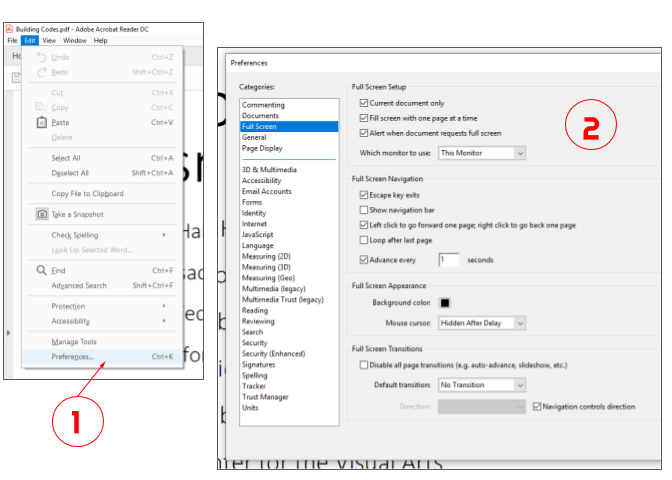
- Under the "Edit" tab, click "Preferences".
- In the [Full Screen] category, you can choose various settings:
- Under the "Full Screen Navigation" Section, you can loop the presentation by checking the "Loop after last page" option.
- You can also set the "speed" of the presentation with the "Advance every [ ] seconds" option.
- It is recommended to leave the "Escape key exits" option checked in order to quit the presentation early.
Present PDF
- Under the "View" tab, click "Full Screen Mode". This will start the presentation.
- In order to end the presentation before it's finished, press Esc


