








How to Import Excel Data into a Word Table
How to Import Excel Data into a Word Table
This help page will show you how to import data from Excel into a Microsoft Word table.
- Open a new or existing document in Microsoft Word.
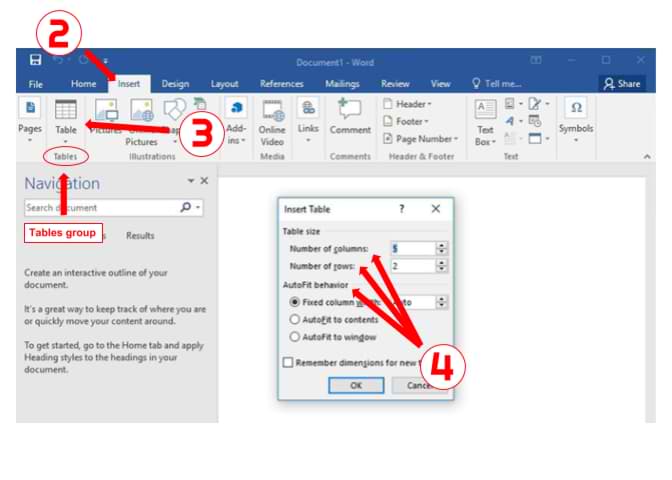
- Click the "Insert" tab > Locate the "Tables" group.
- Select the "Table" icon > Choose the "Insert Table..." option.
- Set the "Number of columns," "Number of rows," and "AutoFit behavior" to your desired specifications > Click [OK].
- Open the Excel file and use your mouse to select the data you wish to import.
- Right-click on the range of cells you have highlighted and select "Copy."
- Switch back to Word and highlight the table cells where you want to import the Excel data.
- Right-click on the Word table and click the option you want under "Paste Options."
Note:
If you select the table in Word, the "Table Tools" tab will appear at the top of the page. Use this tab to format the "Design" and "Layout" of the table to meet your preferences.


