








Convert Data Into a Table in Excel
Convert Data Into a Table in Excel
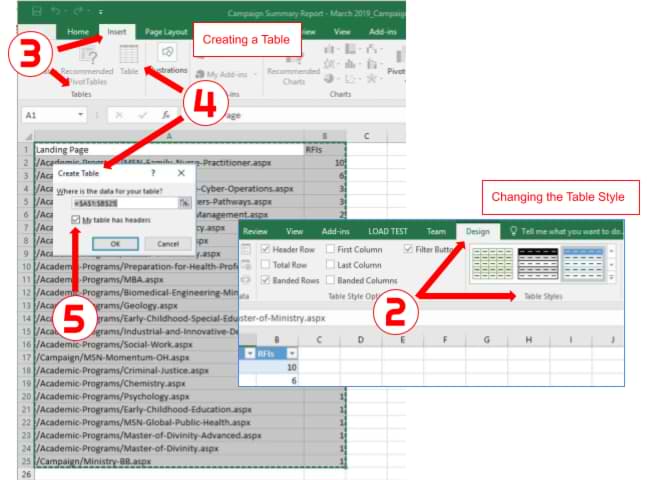
This page will show you how to convert Excel data into a table.
Creating a Table within Excel
- Open the Excel spreadsheet.
- Use your mouse to select the cells that contain the information for the table.
- Click the "Insert" tab > Locate the "Tables" group.
- Click "Table". A "Create Table" dialog box will open.
- If you have column headings, check the box "My table has headers".
- Verify that the range is correct > Click [OK].
- Resize your columns to make the headings visible.
Changing the Table Style
- Click on a cell in the table to activate the "Table Tools" tab.
- Click the "Design" tab > Locate the "Table Styles" group.
- Choose a style/color option that appeals to you. (Hover over the various table styles to see a live preview.)


